

OTP
Information about OTP-based authentication APIs
OTP Authentication
This section covers the OTP-based authentication APIs available in SolidX.
Mental Model
OTP authentication verifies identity with short-lived codes instead of a password-first login.
- Registration is split into initiation and confirmation.
- Login is split into initiation and confirmation.
validationSourcescontrols whether email, mobile, or both are verified.
Authentication Path
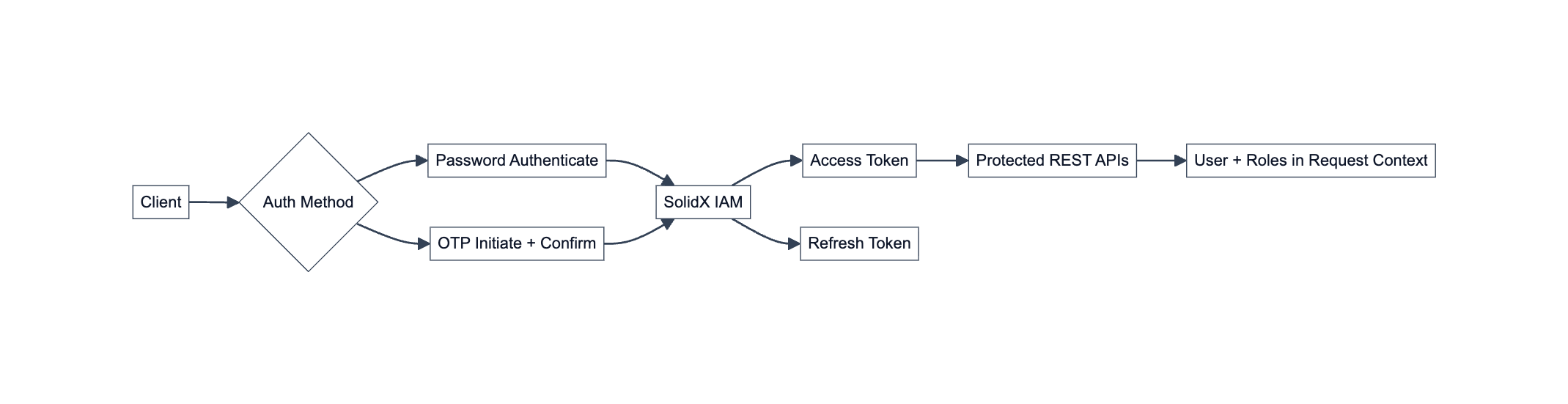
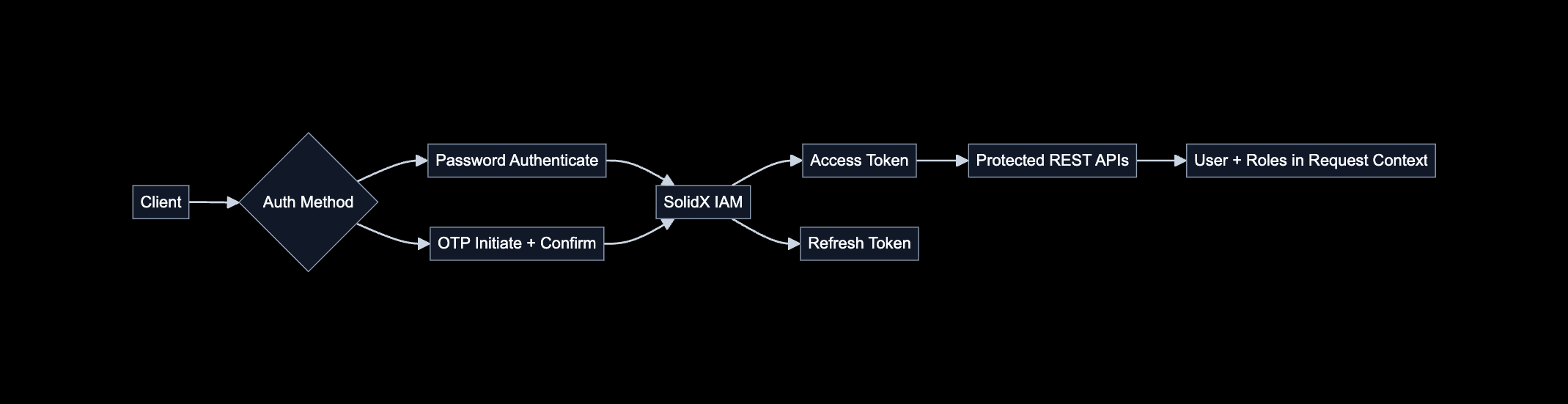
OTP authentication is a passwordless entry point into the SolidX IAM session model.
The OTP endpoints handle delivery and verification of a short-lived code. After the code is confirmed, SolidX IAM returns access and refresh tokens for the authenticated session.
OTP Sign-In Flow
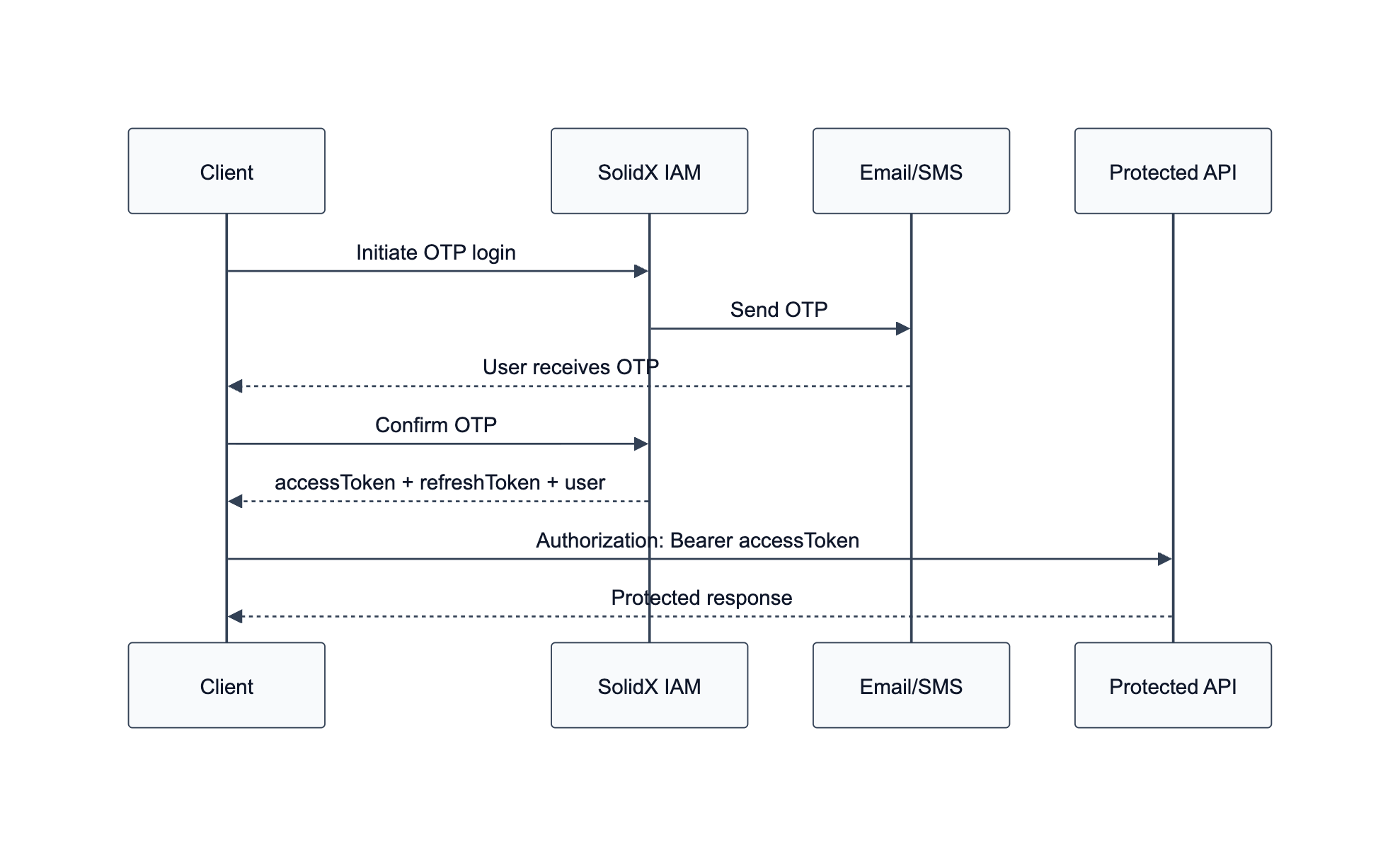
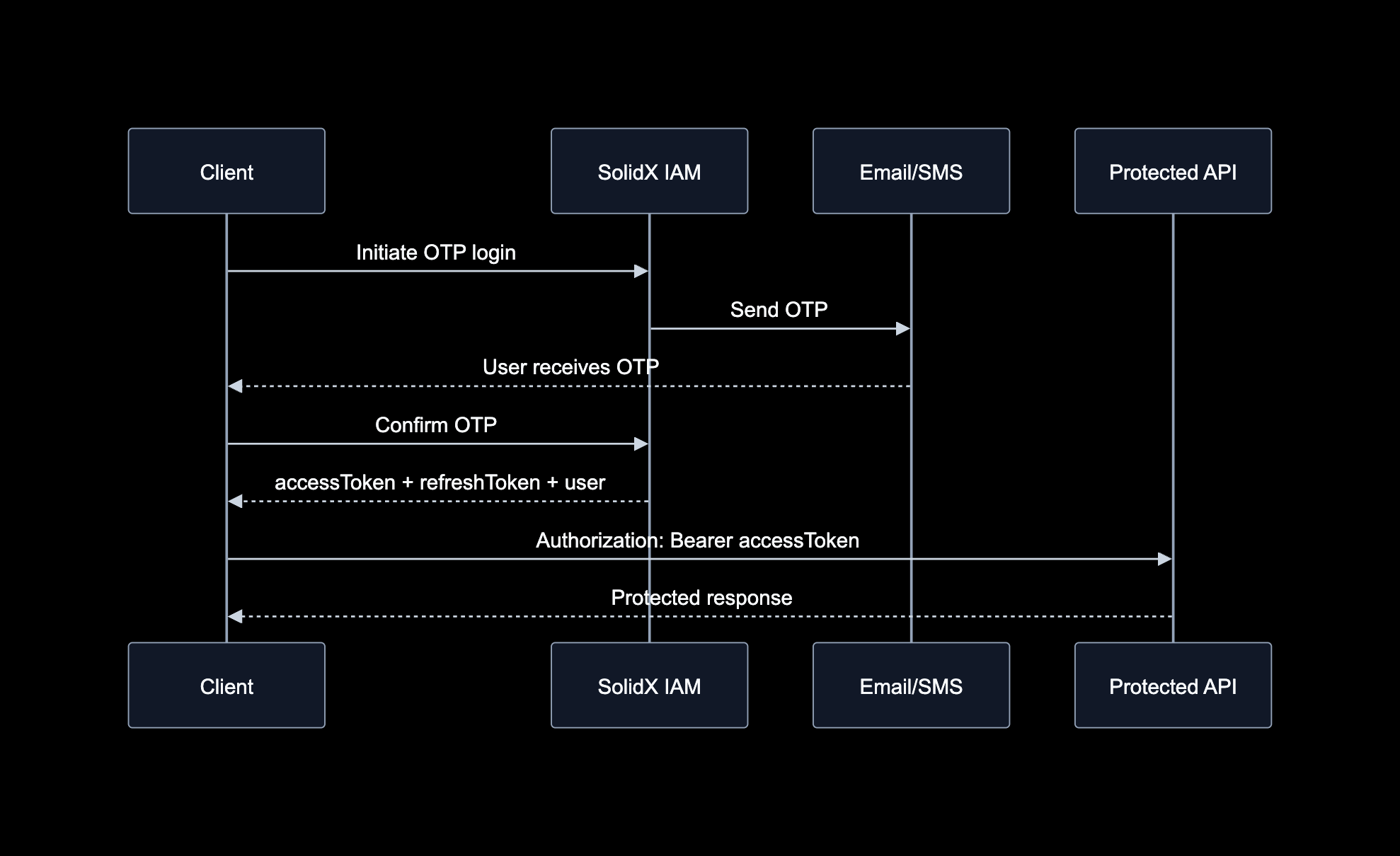
OTP login is a two-step flow: initiate code delivery, then confirm the code to receive tokens and user details.
The diagram above illustrates the standard OTP authentication lifecycle. The application starts login by requesting OTP delivery for an email address or mobile number, then confirms the login with the code provided by the user. A successful confirmation response returns an access token for protected API requests and a refresh token for renewing the session through the refresh endpoint.
Implementation Overview
SolidX provides a comprehensive OTP-based authentication mechanism with the following endpoints:
- Register
- Login
1. Register
1.1 Initiate Registration
Allows users to register using their username, email, or mobile number through OTP verification.
The registration process is divided into two steps:
- Initiate Registration: Sends OTP to specified validation sources.
- Confirm Registration: Confirms registration with the OTP.
The validationSources field in the request body specifies which sources (email, mobile) should be validated. This can be customized via environment variables or overridden via the transactional flag in the request.
Endpoint
POST /api/iam/otp/register/initiateEnvironment Variables
IAM_PASSWORD_LESS_REGISTRATION: Enables/disables OTP registration.IAM_OTP_EXPIRY: OTP expiry time (default: 5 mins).IAM_PASSWORD_LESS_REGISTRATION_VALIDATE_WHAT: Values can beemail,mobile, or both.
Headers
Content-Type: application/jsonRequest Body
{
  "username": "string",
  "email": "[EMAIL]",
  "mobile": "string",
  "validationSources": ["email", "mobile"],
  "customPayload": {}
}
Response Body
{
  "message": "OTP sent successfully"
}
1.2 Confirm Registration
Endpoint
POST /api/iam/otp/register/confirmHeaders
Content-Type: application/jsonRequest Body
{
  "type": "email",
  "identifier": "[EMAIL]",
  "otp": "string"
}
Response Body
{
  "active": true,
  "message": "User registration verified for email"
}
2. Login
2.1 Initiate Login
Allows users to log in using username, email, or mobile through OTP.
Similar to registration, the validationSources and environment variables control OTP delivery.
Endpoint
POST /api/iam/otp/login/initiateEnvironment Variables
IAM_PASSWORD_LESS_REGISTRATION: Enables/disables OTP login.IAM_OTP_EXPIRY: OTP expiry time (default: 5 mins).IAM_PASSWORD_LESS_LOGIN_VALIDATE_WHAT: What to validate during login.
Response Body
{
  "message": "OTP sent successfully"
}
2.2 Confirm Login
Endpoint
POST /api/iam/otp/login/confirmHeaders
Content-Type: application/jsonRequest Body
{
  "type": "email",
  "identifier": "[EMAIL]",
  "otp": "string"
}
Response Body
{
  "accessToken": "<ACCESS_TOKEN>",
  "refreshToken": "<REFRESH_TOKEN>",
  "user": {
    "id": 1,
    "username": "[USERNAME]",
    "email": "[EMAIL]",
    "mobile": "string",
    "lastLoginProvider": "otp",
    "roles": ["User", "Admin"]
  }
}
What Happens After Login?
After successful OTP authentication, the client receives an access token and refresh token. Use the access token in the Authorization: Bearer <ACCESS_TOKEN> header for protected APIs. Use the refresh token only with the refresh endpoint, and store it as a sensitive credential rather than regular client-side state.