

Password
Information about password-based authentication APIs
Password Authentication
This section covers the password-based authentication APIs available in SolidX.
Mental Model
Password authentication establishes a SolidX session from user credentials and then keeps that session active through access and refresh tokens.
- Registration creates the user account when public registration is enabled.
- Authentication exchanges credentials for tokens.
- Refresh, password reset, user info, and logout manage the lifecycle of that session.
Authentication Path
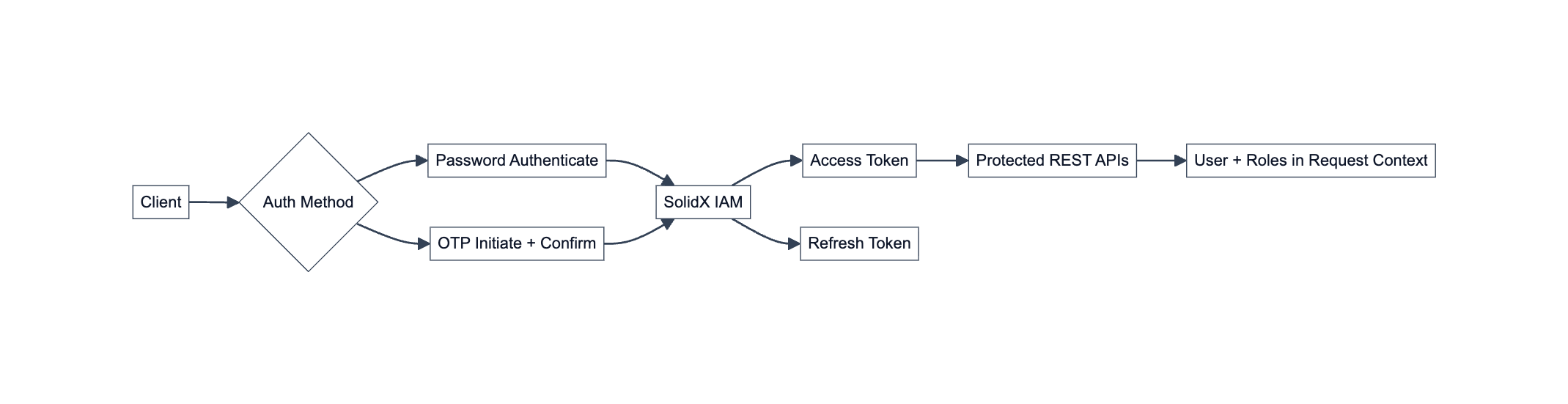
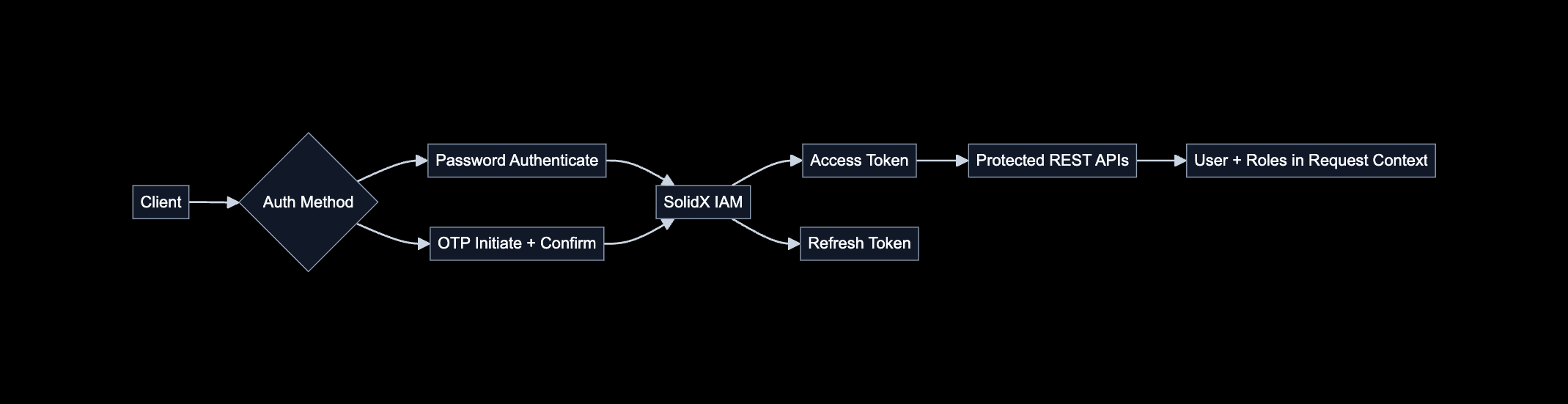
Password authentication establishes a SolidX IAM session from user-managed credentials.
In a password-based flow, your application collects the user's email or username and password, then sends them to POST /api/iam/authenticate. If the credentials are valid, SolidX IAM returns two tokens:
accessToken: Send this with each protected API request in theAuthorization: Bearer <ACCESS_TOKEN>header.refreshToken: Use this only to request a new access token when the current one expires. Treat it as a long-lived secret. SolidX returns both tokens in the JSON response body. Store the refresh token as a sensitive credential, not as regular client-side application state.
When a protected REST API receives the bearer token, SolidX validates it, identifies the user, loads the user's roles, and makes that authenticated context available to the API request.
Password Sign-In Flow
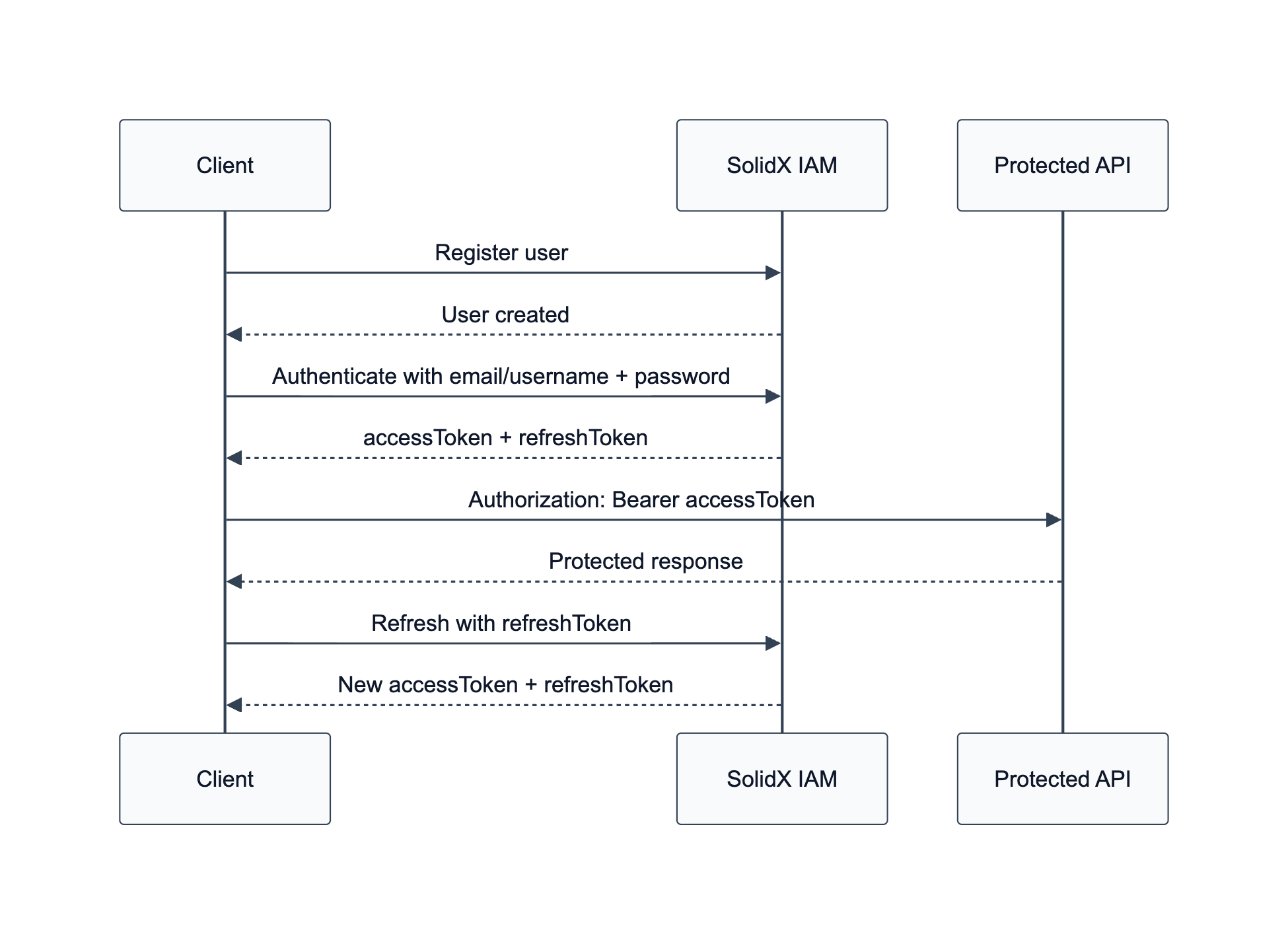
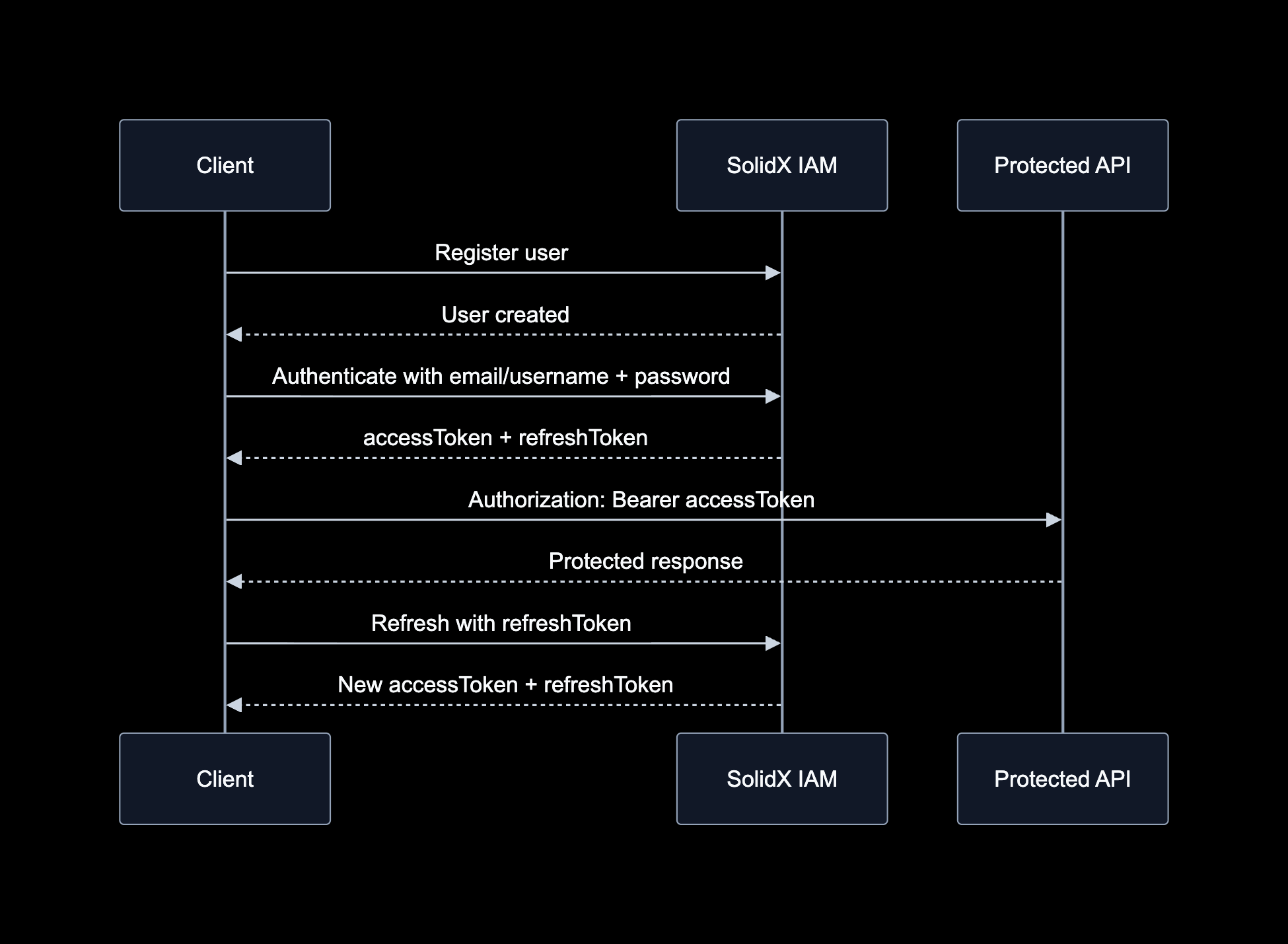
The password flow starts with registration, exchanges credentials for tokens, and uses refresh tokens to continue the session.
The diagram above illustrates the standard password-authentication lifecycle. After a user account exists, the application submits the user's credentials to SolidX IAM. A successful authentication response returns an access token for protected API requests and a refresh token for renewing the session through the refresh endpoint.
Implementation Overview
SolidX provides a comprehensive password-based authentication mechanism with the following endpoints:
- Register
- Authenticate
- Refresh Tokens
- Forgot Password
- Change Password
- Get User Info
- Logout
Token Lifecycle
The authenticate endpoint returns access and refresh tokens. Use the access token for protected API calls, and use the refresh token when the access token expires.
1. Register
Allows users to create a new account.
Endpoint
POST /api/iam/registerEnvironment Variables
IAM_ALLOW_PUBLIC_REGISTRATION: Allows public registration when set totrue.
Headers
Content-Type: application/jsonRequest Body
{
  "fullName": "string",
  "username": "string",
  "email": "[EMAIL]",
  "password": "[PASSWORD]",
  "mobile": "string",
  "roles": ["string"]
}
Response Body
{
  "fullName": "string",
  "username": "string",
  "email": "[EMAIL]",
  "mobile": "string",
  "forcePasswordChange": true,
  "roles": [...],
  "id": 0,
  "createdAt": "...",
  "updatedAt": "..."
}
Response Note
The response body can be optimized. It currently includes sensitive data like passwords.
2. Authenticate
Log in and receive access and refresh tokens.
Endpoint
POST /api/iam/authenticateEnvironment Variables
IAM_JWT_ACCESS_TOKEN_TTL: TTL for access tokens (default: 60 mins).IAM_JWT_REFRESH_TOKEN_TTL: TTL for refresh tokens (default: 1 day).
Headers
Content-Type: application/jsonRequest Body
{
  "email": "[EMAIL]",
  "username": "",
  "password": "[PASSWORD]"
}
Response Body
{
  "data": {
    "user": {
      "email": "[EMAIL]",
      "username": "[EMAIL]",
      "roles": ["Admin", "Internal User"]
    },
    "accessToken": "<ACCESS_TOKEN>",
    "refreshToken": "<REFRESH_TOKEN>"
  }
}
3. Refresh Tokens
Refresh the access token using a valid refresh token.
Endpoint
POST /api/iam/refresh-tokensResponse Body
{
  "accessToken": "<NEW_ACCESS_TOKEN>",
  "refreshToken": "<NEW_REFRESH_TOKEN>"
}
4. Forgot Password
Initiates and confirms password reset flow.
Environment Variables
IAM_OTP_EXPIRY: OTP expiry time (default: 10 mins).
4.1 Initiate Forgot Password
Starts the password reset process and sends a reset token to the user.
Endpoint
POST /api/iam/initiate/forgot-passwordResponse Body
{
  "status": "success",
  "message": "Password reset token sent",
  "data": {
    "user": {
      "email": "[EMAIL]",
      "username": "string"
    }
  }
}
4.2 Confirm Forgot Password
Completes the password reset process with the verification token and new password.
Endpoint
POST /api/iam/confirm/forgot-passwordHeaders
Content-Type: application/jsonRequest Body
{
  "username": "string",
  "email": "[EMAIL]",
  "verificationToken": "string",
  "password": "[NEW_PASSWORD]"
}
Response Body
{
  "status": "success",
  "message": "Forgot password confirmed.",
  "error": "",
  "errorCode": "",
  "data": {}
}
5. Change Password
Changes the password for an existing user.
Endpoint
POST /api/iam/change-passwordHeaders
Content-Type: application/json
Authorization: Bearer <ACCESS_TOKEN>
Request Body
{
  "id": 0,
  "email": "[EMAIL]",
  "currentPassword": "[CURRENT_PASSWORD]",
  "newPassword": "[NEW_PASSWORD]"
}
6. Get User Info
Retrieve logged-in user info.
Endpoint
GET /api/iam/meHeaders
Authorization: Bearer <ACCESS_TOKEN>Response Body
{
  "user": {
    "email": "[EMAIL]",
    "username": "[EMAIL]",
    "roles": ["Admin"]
  },
  "accessToken": "<ACCESS_TOKEN>",
  "refreshToken": "<REFRESH_TOKEN>"
}
7. Logout
Invalidate the current session.
Endpoint
POST /api/iam/logoutHeaders
Content-Type: application/jsonRequest Body
{
  "refreshToken": "<REFRESH_TOKEN>",
  "allDevices": false
}
refreshToken is required. Set allDevices to true to revoke refresh tokens for every device belonging to the user. Omit it or set it to false to sign out only the session that issued this refresh token.
Response Body
{
  "message": "Logged out successfully"
}
What Happens After Login?
After successful password authentication, the client receives an access token and refresh token in the JSON response. Use the access token in the Authorization: Bearer <ACCESS_TOKEN> header for protected APIs. Use the refresh token only with the refresh endpoint, and store it as a sensitive credential rather than regular client-side state.