

Models
SolidX Models represent the structure of your data within a module. Each model defines a specific type of data, all attributes / fields that a model is made of & its relationships with other models.
Each model is a semantic, configurable data structure that forms the basis of adding custom business logic.
Creating a Model
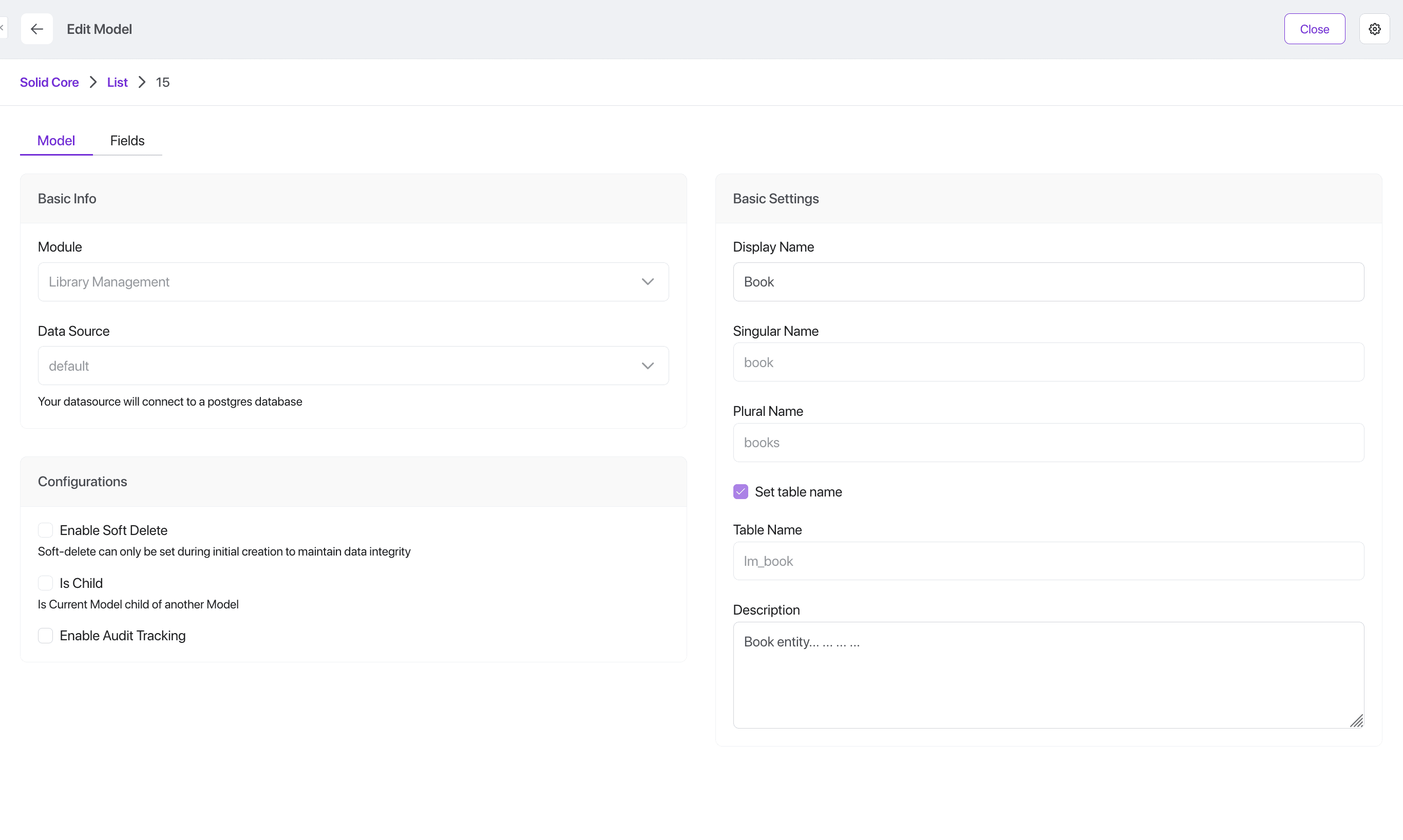
To create a new model:
- Navigate to the App Builder, then click on the "Model" menu item.
- This will show a list of existing models in the system.
- Click on "Add"
- To create a model, you'll be prompted to provide the following metadata:
Model Metadata
| Setting | Description |
|---|---|
| Module | Every model belongs to one module, this is a dropdown of all modules configured in the system. |
| Data Source | SolidX allows you to create models reading / writing data from different data sources. You choose the data source here. |
| Display Name | Display name of the newly created model. |
| Singular Name | Singular name of the model, used for internal purposes like API endpoints etc. |
| Plural Name | Plural name of the model, used for internal purposes like API endpoints etc. |
| Table Name | By default table names are generated automatically based on the singular name of the model, you can choose to specify a different name if required. |
| Enable Soft Delete | If you would like to support soft delete functionality on a model. |
| Enable Draft & Publish Workflow | If you would like records to go through a draft/publish workflow instead of being live the moment they're saved. |
| Is Internationalisation Enabled | If you would like records to support translations in multiple languages. Can only be set when the model is first created. |
| Is Child | Sometimes you want to create an extension of an existing model, especially in IAM you might want to extend the user model to create your own definition of a user object. |
| Enable Audit Tracking | If you would like to audit all data mutations that happen on this model. |
Advanced Features
Soft Delete
Soft delete is a way to "hide" records instead of permanently removing them from the system. When you soft delete something - like a user, form, or entry - it doesn't actually get erased from the database. Instead, it's marked as deleted and no longer shown in the app. This helps prevent accidental data loss and makes it possible to restore deleted items if needed later.
To enable this, click on the checkbox under "Configurations".
Draft & Publish Workflow
Draft & Publish lets you work on changes to a record without affecting what your users currently see. Every edit to a live record creates a new draft version alongside it - the published version stays exactly as it is until you choose to publish the draft. Every past version stays available as read-only history, so nothing is ever lost.
To enable this, click on the checkbox under "Configurations".
Draft & Publish supports:
- Editing a live record without changing what's publicly visible
- Publishing a draft to make it live, or unpublishing to roll back to the previous version
- Viewing the full history of every version a record has gone through
Audit Tracking
Audit tracking helps you keep a detailed record of everything that happens to your data. It automatically logs who created, updated, or deleted a record - and when they did it. You can also track important business events using custom audit entries. All this information is easily accessible from the form view of each record, where you can filter by date, user, or event type to see exactly what changed and who made the change. This ensures transparency, accountability, and peace of mind.
To enable this, click on the checkbox under "Configurations".
Comprehensive tracking of record changes:
- Creation timestamp and user
- Modification timestamp and user
- Deletion timestamp and user (with soft delete)
- Field-level change history
- Custom audit events
Internationalization
Internationalization lets you manage content in multiple languages within the same model. Each record can have translations linked together - so you can easily create and manage versions of the same entry in different languages. This is especially useful for global apps where users need to see content in their preferred language. Our platform handles the complexity for you, allowing you to switch between languages and manage translations seamlessly from the same interface.
Internationalization supports:
- Editing content of the model in multiple languages
- Fetching this content easily using our API
Fields
A core part of defining a model involves defining all the fields that make up the model. SolidX provides a very rich abstraction around how fields are configured against a model.
Fields in SolidX go beyond basic types like string or integer. They support rich semantic types that allow for expressive and dynamic user interfaces out of the box:
- one2many, many2one, many2many: Define relationships between models just like you would in a full-stack framework.
- selectionStatic: Create dropdowns using static value lists (e.g. status: [New, In Review, Approved]).
- selectionDynamic: Fetch dropdown options from dynamic sources such as APIs (e.g. countries from a REST endpoint).
- mediaSingle / mediaMultiple: Allow single or multiple file uploads including images, documents, audio, or video.
- richText / markdown / json / expression: Provide advanced content editing, structured data input, or script-based values.
Generated Code
When a new model is created, SolidX generates a bunch of boilerplate code linked to this model.
To see the impact of what happens when we generate the code linked to a model metadata, you can view our developer documentation.
Related Recipes
- Additional Datasources - Add additional data sources to your application
- Soft Delete - Configure soft delete functionality on your models
- Custom User Model - Create a custom user object while keeping roles and permissions intact
- Internationalization - Create models for multi-lingual content when using SolidX as a headless CMS
- Draft & Publish Workflow - Version records as drafts and publish them live