
Emails
Sending Emails
SMTP
SolidX email configuration allows you to send emails using any SMTP credentials. Use the below environment variables to configure the same.
Environment Variables
| Variable Name | Description | Values |
|---|---|---|
| COMMON_EMAIL_SHOULD_QUEUE | Whether to queue emails or send immediately | true: queue for async sending; false: send immediately |
| COMMON_SMTP_EMAIL_SMTP_HOST | The hostname of the SMTP server | e.g., smtp.gmail.com, smtp.sendgrid.net |
| COMMON_SMTP_EMAIL_SMTP_PORT | The port used by the SMTP server | Common values: 587 (TLS), 465 (SSL), 25 (non-secure) |
| COMMON_SMTP_EMAIL_USERNAME | Username for SMTP authentication | Usually an email address |
| COMMON_SMTP_EMAIL_PASSWORD | Password or app-specific password for SMTP | Should be stored securely (e.g., in environment/secret) |
| COMMON_SMTP_EMAIL_FROM | The default “from” address used in sent emails | e.g., no-reply@yourdomain.com |
COMMON_EMAIL_SHOULD_QUEUE
- This variable used to control whether emails are sent synchronously or asynchronously using queues Recipes Documentation ➜
Triggering Emails
You can trigger emails from anywhere in your code by simply injecting the SMTPEMailService. Below code snippet is from the SolidX authentication service, as you can see below the SMTPEmailService is injected like any other dependency in the constructor.
@Injectable()
export class AuthenticationService {
    private readonly logger = new Logger(AuthenticationService.name);

    constructor(
        private readonly userService: UserService,
        @InjectRepository(User) private readonly userRepository: Repository<User>,
        @InjectRepository(UserPasswordHistory) private readonly userPasswordHistoryRepository: Repository<UserPasswordHistory>,
        private readonly hashingService: HashingService,
        private readonly jwtService: JwtService,
        @Inject(jwtConfig.KEY)
        private readonly jwtConfiguration: ConfigType<typeof jwtConfig>,
        @Inject(iamConfig.KEY)
        private readonly iamConfiguration: ConfigType<typeof iamConfig>,
        private readonly refreshTokenIdsStorage: RefreshTokenIdsStorageService,
        private readonly httpService: HttpService,
        private readonly mailService: SMTPEMailService,
        private readonly smsService: Msg91OTPService,
        private readonly eventEmitter: EventEmitter2,
        private readonly settingService: SettingService,
        private readonly roleMetadataService: RoleMetadataService,
        @Inject(commonConfig.KEY)
        private readonly commonConfiguration: ConfigType<typeof commonConfig>,

    ) { }

....
....
....
....

}
And then we can trigger an email, again a sample code snippet from SolidX authentication service is shown below. The below code is using the sendEmailUsingTemplate method exposed by the SMTPEmailService, this method allows you to send emails based on pre-configured email templates. You can also use another method called sendEmail that allows you to specify the email body directly.
Template Based Emails
More info on template based emails can be found here.
    private async notifyUserOnForcePasswordChange(user: User, autoGeneratedPwd: string) {
        const companyLogo = await this.getCompanyLogo();

        this.mailService.sendEmailUsingTemplate(
            user.email,
            'on-force-password-change',
            {
                solidAppName: process.env.SOLID_APP_NAME,
                solidAppWebsiteUrl: process.env.SOLID_APP_WEBSITE_URL,
                frontendLoginPageUrl: process.env.IAM_FRONTEND_APP_LOGIN_PAGE_URL,
                email: user.email,
                fullName: user.fullName,
                userName: user.username,
                password: autoGeneratedPwd,
                companyLogoUrl: companyLogo
            },
            this.commonConfiguration.shouldQueueEmails,
            'user',
            user.id
        );

    }
Elastic Email
SolidX also supports sending emails via Elastic Email, a third-party email delivery service. Below is how to configure and use it in your app.
Environment Variables
| Variable Name | Description | Values |
|---|---|---|
| COMMON_EMAIL_SHOULD_QUEUE | Whether to queue emails or send immediately | true: queue for async sending; false: send immediately |
| COMMON_ELASTICMAIL_API_KEY | Your Elastic Email API key used to authenticate API requests | e.g., BB364A79... |
Triggering Emails
To send emails using Elastic Email in SolidX, simply inject the ElasticEmailService just like SMTPEmailService.
@Injectable()
export class SomeService {
  constructor(private readonly mailService: ElasticEmailService) {}

  async notifyUser(user: User, autoGeneratedPwd: string) {
    await this.mailService.sendEmailUsingTemplate(
      user.email,
      'on-force-password-change',
      {
        solidAppName: process.env.SOLID_APP_NAME,
        solidAppWebsiteUrl: process.env.SOLID_APP_WEBSITE_URL,
        frontendLoginPageUrl: process.env.IAM_FRONTEND_APP_LOGIN_PAGE_URL,
        email: user.email,
        fullName: user.fullName,
        userName: user.username,
        password: autoGeneratedPwd,
        companyLogoUrl: await this.getCompanyLogo()
      },
      true, // shouldQueueEmails
      'user',
      user.id
    );
  }
}
Template Based Emails
- Here is how the SolidX Email Template Form View looks like:
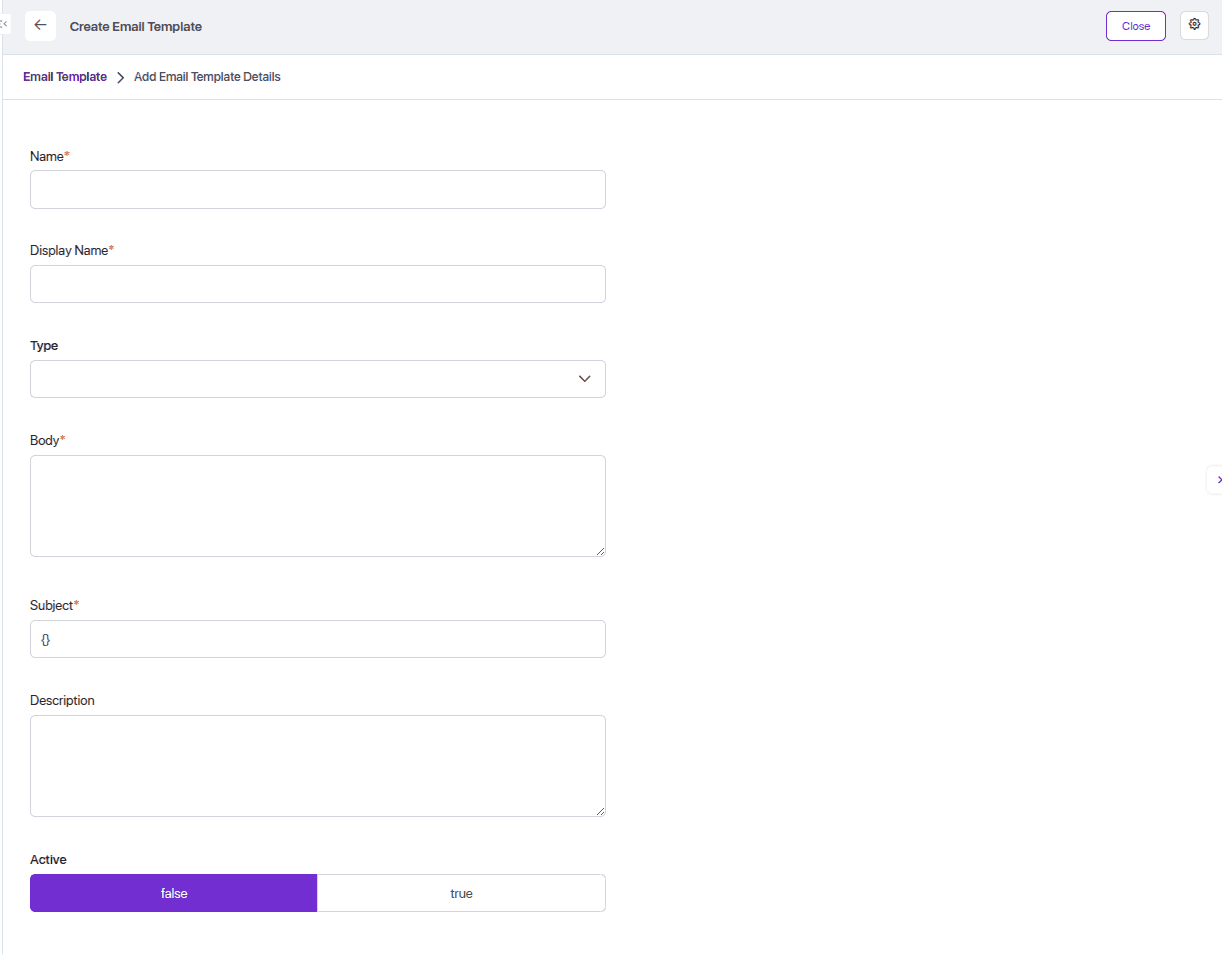
- All the fields of the Email Template are described in the table below:
| Field Name | Description | Values / Behavior |
|---|---|---|
| name | Unique identifier used internally to refer to the template | Must be unique (e.g., student-fee-reminder) |
| displayName | Human-readable name shown in admin UI | Any string, used for readability (e.g., Student Fee Reminder) |
| body | The main email body (HTML or plain text supported) | Email content; supports template variables (e.g., {{studentName}}) |
| subject | Email subject line | Can include template variables; default is empty ({}) |
| description | Optional description for the email template | Explains purpose or usage; optional |
| active | Indicates whether the template is active and usable | true: can be used; false: ignored/skipped |
| attachments | List of associated file attachments sent with the email | Array of EmailAttachment entities (e.g., PDFs, reports) |
| type | Category or grouping of the email template (optional) | e.g., notification, reminder, marketing |
- Below is the list view from SolidX showing the pre-configured email templates:
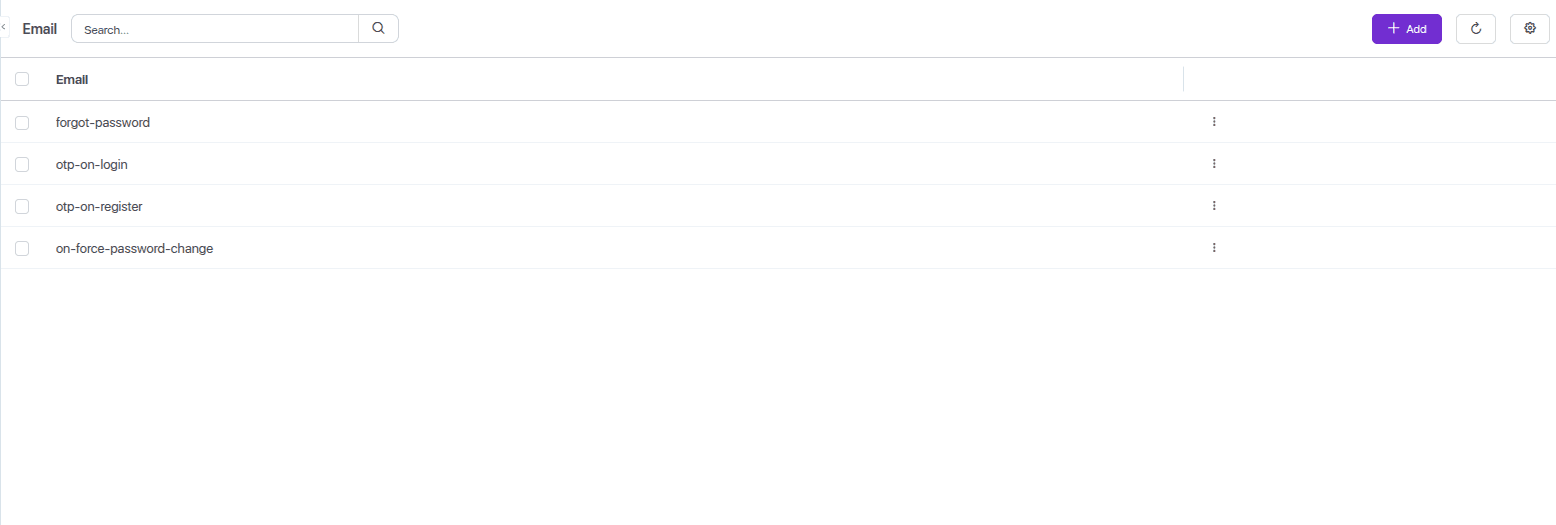
- All the email templates of Solidx are described in the table below:
| Template Name | Purpose |
|---|---|
forgot-password | Sent when a user requests to reset their password |
otp-on-login | Sent to the user with a One-Time Password (OTP) during login |
otp-on-register | Sent with an OTP to verify user identity during registration |
on-force-password-change | Sent when the user is forced to change their password (e.g., for security) |
Here is the solidx email sending code snippet which use sendEmailUsingTemplate method to sent emails.
    private async notifyUserOnForcePasswordChange(user: User, autoGeneratedPwd: string) {
        const companyLogo = await this.getCompanyLogo();

        this.mailService.sendEmailUsingTemplate(
            user.email,
            'on-force-password-change',
            {
                solidAppName: process.env.SOLID_APP_NAME,
                solidAppWebsiteUrl: process.env.SOLID_APP_WEBSITE_URL,
                frontendLoginPageUrl: process.env.IAM_FRONTEND_APP_LOGIN_PAGE_URL,
                email: user.email,
                fullName: user.fullName,
                userName: user.username,
                password: autoGeneratedPwd,
                companyLogoUrl: companyLogo
            },
            this.commonConfiguration.shouldQueueEmails,
            'user',
            user.id
        );
}- All the arguments used in the SolidX sendEmailUsingTemplate(...) method are described in the table below:
| Arguments Name | Purpose |
|---|---|
user.email | The recipient’s email address. |
on-force-password-change | The name of the email template to be used for this email. |
Template Variables | A data object containing dynamic values that will replace variables in the email template. |
solidAppName | The name of the application, usually shown in the email footer or heading. |
solidAppWebsiteUrl | The URL to the application's public site or landing page. |
frontendLoginPageUrl | The direct login page URL, used in the email as a call-to-action link. |
email | The full name of the user (used in personalization). |
fullName | The name of the application, usually shown in the email footer or heading. |
userName | The user’s login username. |
password | The newly generated password to be shared with the user. |
companyLogoUrl | The logo URL to visually brand the email. |
shouldQueueEmails | A boolean flag indicating whether the email should be queued or sent immediately. |