
Extending Users
Extending Users
Extending the SolidX user model
You can extend the built-in SolidX User model to attach additional fields or relationships required by your application. Follow the steps below to do this from the App Builder:
Step 1: Navigate to Model Creation
- Go to the SolidX Module.
- Click on App Builder → Models.
- Create a new model or open an existing one that you want to extend.
Step 2: Enable as Child of SolidX User
- In the Model Creation screen, fill in all the required fields like Name, Display Name, etc.
- Scroll down to the Configuration section.
- Enable the Is Child checkbox.
- A dropdown will appear — select SolidX User from the list.
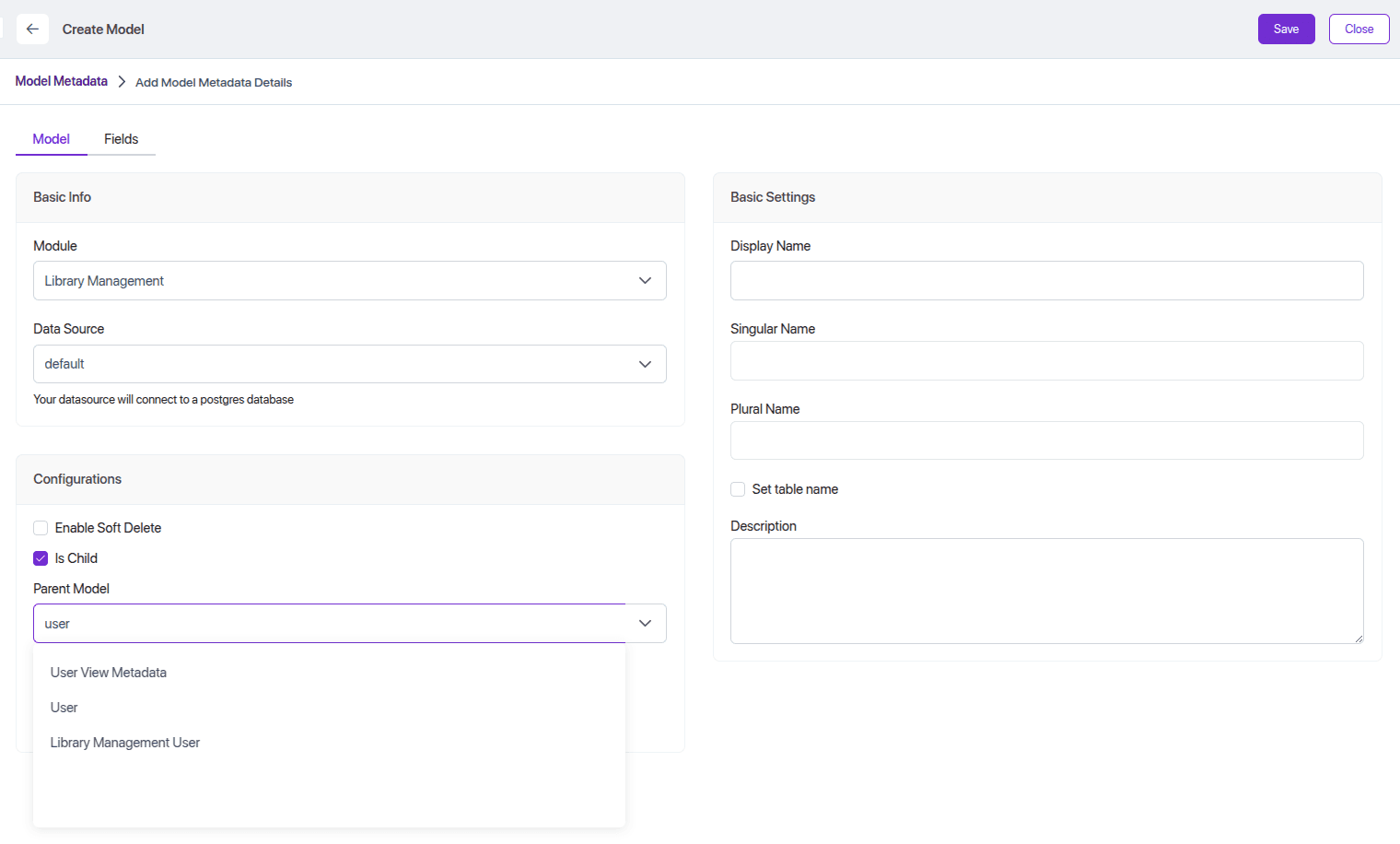
Once selected, your model will now extend the SolidX User model, allowing it to inherit its core identity fields while adding your own custom fields.
After extending the SolidX User model, your form view might look like this:
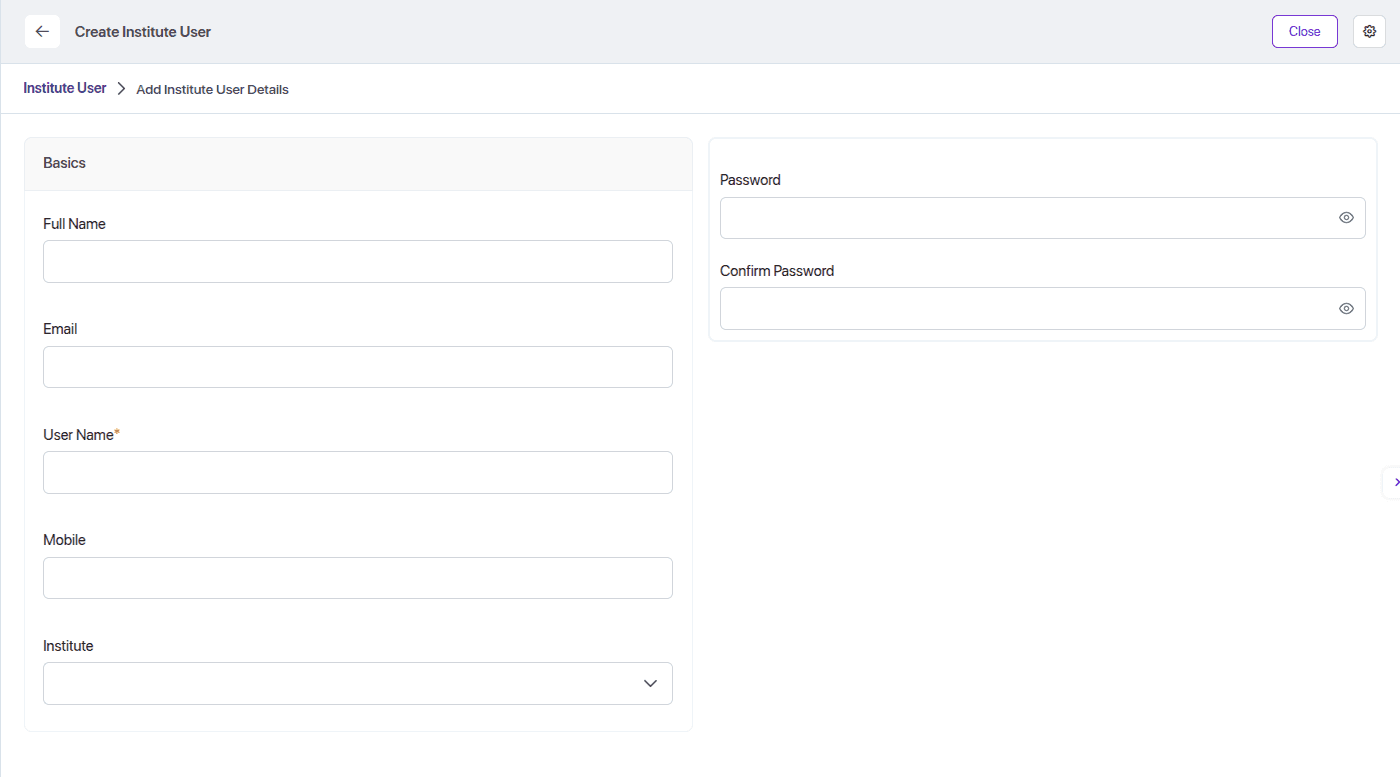
Institute User Form View Layout
{
  "type": "form",
  "attrs": {
    "name": "form-1",
    "label": "Institute User",
    "className": "grid"
  },
  "onFieldChange": "bondHandler",
  "children": [
    {
      "type": "sheet",
      "attrs": {
        "name": "sheet-1"
      },
      "children": [
        {
          "type": "row",
          "attrs": {
            "name": "sheet-1"
          },
          "children": [
            {
              "type": "column",
              "attrs": {
                "name": "group-1",
                "label": "Basics",
                "className": "col-6"
              },
              "children": [
                {
                  "type": "field",
                  "attrs": {
                    "name": "fullName"
                  }
                },
                {
                  "type": "field",
                  "attrs": {
                    "name": "email"
                  }
                },
                {
                  "type": "field",
                  "attrs": {
                    "name": "username"
                  }
                },
                {
                  "type": "field",
                  "attrs": {
                    "name": "mobile"
                  }
                },
                {
                  "type": "field",
                  "attrs": {
                    "name": "institute"
                  }
                }
              ]
            },
            {
              "type": "column",
              "attrs": {
                "name": "group-1",
                "label": "",
                "className": "col-6"
              },
              "children": [
                {
                  "type": "field",
                  "attrs": {
                    "name": "password"
                  }
                }
              ]
            }
          ]
        }
      ]
    }
  ]
}
In the form above:
fullName, email, mobile, password → come from the SolidX User model
userType, institute → come from the Institute User model
Institute User Entity
Once extended, your InstituteUser entity might look like this:
@ChildEntity()
export class InstituteUser extends User {
    @Column({ type: "varchar" })
    userType: string;
    @ManyToOne(() => Institute, { onDelete: "CASCADE", nullable: true })
    @JoinColumn()
    institute: Institute;
}
Institute User Create Dto
Once extended, your InstituteUser create Dto might look like this:
export class CreateInstituteUserDto extends CreateUserDto {
    @IsNotEmpty()
    @IsString()
    @ApiProperty()
    userType: string;
    @IsOptional()
    @IsInt()
    @ApiProperty()
    instituteId: number;
    @IsString()
    @IsOptional()
    @ApiProperty()
    instituteUserKey: string;
}
Institute User Update Dto
Once extended, your InstituteUser update Dto might look like this:
export class UpdateInstituteUserDto extends UpdateUserDto {
    @IsOptional()
    @IsInt()
    id: number;
    @IsNotEmpty()
    @IsOptional()
    @IsString()
    @ApiProperty()
    userType: string;
    @IsOptional()
    @IsInt()
    @ApiProperty()
    instituteId: number;
    @IsString()
    @IsOptional()
    @ApiProperty()
    instituteUserKey: string;
}
Controller Method (Create Institute User)
In the controller, the create method for institute users you need to change like below to use the SolidX auth logic:
create(
  @Body() createDto: CreateInstituteUserDto,
  @UploadedFiles() files: Array<Express.Multer.File>
) {
  const signupDto = this.service.toSignUpDto(createDto);
  return this.authenticationService.signupForExtensionUser(signupDto, createDto, this.repo);
}
The signupForExtensionUser method is responsible for:
Registering the user using the base SolidX User logic
Handling both provided and missing passwords:
If password is provided: user is created directly
If password is not provided: a random password is generated and emailed to the user
This way, you get full authentication and user provisioning using SolidX’s base system with custom fields.