

Institute Onboarding
Learn how to onboard educational institutes to the Fees Portal.
Overview
This feature is configured by the Super Admin and subsequently managed by Institute Admins. The Super Admin onboards the institute and creates its admin users; Institute Admins then take ownership - adding fee types, managing branding, and maintaining their institute's configuration. Key capabilities include:
- Complete institute profile management (name, address, contact details)
- Payment gateway configuration per institute
- Custom branding and theming for student portals
- Support personnel information setup
- Multi-tenant architecture supporting multiple institutes i.e (Institute Admins can only see/ manage their own institute data)
Data Models
This section describes the three models you need to implement for institute onboarding, along with step-by-step instructions to create them in SolidX.
New to the Module Builder?
If you're unfamiliar with how modules, models, and fields work in SolidX, review the Module Builder documentation first - it covers Module Management, Model Management, and Field Management.
How These Models Connect
Your Institution
  ├── Collects multiple types of fees
  │   └── Example: Tuition, Bus, Hostel, Lab, Sports fees
  │
  └── Has multiple institute admin userss managing it
      └── Example: Principal, Accountant, Desk Staff

Each Fee Type
  └── Belongs to one institution
      └── Your "Tuition Fees" is separate from another school's "Tuition Fees"

Each Institute Admin User
  └── Manages one institution
      └── Cannot access other institutions' data
1. Institute Model
Represents your educational institution - the top-level entity that owns fee types, payment configuration, and institute admin userss.
Model Configuration
| Setting | Value |
|---|---|
| Singular Name | institute |
| Plural Name | institutes |
| Display Name | Institute |
| Description | The institute name... |
| Data Source | default |
| Data Source Type | postgres |
| Table Name | fees_portal_institute |
| Enable Audit Tracking | ✓ Yes |
| Enable Soft Delete | ☐ No |
| Draft Publish Workflow | ☐ No |
| Internationalization | ☐ No |
| Is Child Model | ☐ No |
Fields
| # | Name | Display Name | Type | Req? | Key Config |
|---|---|---|---|---|---|
| 1 | instituteName | Institute Name | Short Text | Yes | Unique Index Is User Key Audit |
| 2 | logo | Logo | Media (Single) | Yes | image max 5120 KB default-filesystem |
| 3 | description | Description | Long Text | No | - |
| 4 | paymentGatewayMerchantId | Cust Code | Short Text | Yes | Unique Audit |
| 5 | paymentGatewayAccessKey | Access Key | Short Text | Yes | Unique Audit |
| 6 | paymentGatewayAccessSecret | Access Secret | Short Text | Yes | Audit |
| 7 | instituteAddress | Institute Address | Long Text | No | - |
| 8 | instituteBrochure | Institute Brochure | Media (Single) | No | file max 5120 KB default-filesystem |
| 9 | instituteIntroVideo | Institute Intro Video | Media (Single) | No | video max 5120 KB default-filesystem |
| 10 | supportEmail | Support Email | Short Text | Yes | Audit |
| 11 | supportMobile | Support Mobile | Short Text | Yes | Min/Max Length: 10 Audit |
| 12 | gst | GST | Short Text | No | Audit |
| 13 | tnC | Terms and Conditions | Rich Text | No | - |
| 14 | faqs | FAQs | Rich Text | No | - |
| 15 | privacyPolicy | Privacy Policy | Rich Text | No | - |
| 16 | emailDomain | Email Domain | Short Text | No | Audit |
| 17 | custUserId | Cust UserID | Short Text | Yes | - |
| 18 | hostedPagePrefix | Hosted Page Prefix | Short Text | Yes | Unique Audit Subdomain prefix - e.g. delhi → delhi.<base-domain> |
| 19 | status | Status | Selection (Static) | Auto | Default: InActiveValues: InActive, ActiveIndex Audit |
Note
The relation fields (feeTypes and instituteUsers) are added in Step 4 after the co-models exist. Deleting an Institute cascades to all its fee types and users via those relations.
2. Fee Type Model
Represents a category of fees collected by an institution (e.g. Tuition, Bus, Hostel). Each fee type belongs to exactly one institution.
Model Configuration
| Setting | Value |
|---|---|
| Singular Name | feeType |
| Plural Name | feeTypes |
| Display Name | Fee Type |
| Description | Model used to capture different fee types that a school, institute might use. |
| Data Source | default |
| Data Source Type | postgres |
| Table Name | fees_portal_fee_type |
| Enable Audit Tracking | ✓ Yes |
| Enable Soft Delete | ☐ No |
| Draft Publish Workflow | ☐ No |
| Internationalization | ☐ No |
| Is Child Model | ☐ No |
Fields
| # | Name | Display Name | Type | Req? | Key Config |
|---|---|---|---|---|---|
| 1 | feeType | Fee Type | Short Text | Yes | Is User Key Audit |
| 2 | institute | Institute | Relation | Yes | Many-to-One → institute (fees-portal)Inverse field: feeTypesCreate Inverse: ✓ Yes Cascade Audit |
| 3 | partPaymentAllowed | Part Payment Allowed | Boolean | Yes | Audit |
| 4 | latePaymentFeesType | Late Payment Fees Type | Selection (Static) | No | Default: NoneValues: None, Percent, AbsoluteAudit |
| 5 | latePaymentFees | Late Payment Fees | Decimal | No | Default: 0Audit |
| 6 | feeTypeUserKey | Fee Type User Key | Computed | Yes | Unique Is User Key Type: string Provider: ConcatEntityComputedFieldProviderConcatenates feeType + institute.instituteName → hyphen-separated slug (full config ↓)Trigger: before-insert on feeType (fees-portal) |
Note
Two institutes can each have a "Tuition Fees" entry. A single institute cannot have two entries with the same name - feeTypeUserKey (field 6) enforces this by concatenating the fee type name and institute name into a unique slug.
feeTypeUserKey - Full provider context JSON
{
  "fields": ["feeType", "institute.instituteName"],
  "separator": "-",
  "slugify": true
}
3. Institute User Model
Represents an administrative staff member who manages a single institution's portal. Extends SolidX's built-in User model, inheriting standard fields (email, password, first name, last name).
Info
The child model adds only the institute-specific fields below, without duplicating standard user fields. For a deeper look - including overriding user creation logic - see Extending Users.
Model Configuration
| Setting | Value |
|---|---|
| Singular Name | instituteUser |
| Plural Name | instituteUsers |
| Display Name | Institute User |
| Description | This table allows us to store institute user records |
| Data Source | default |
| Data Source Type | postgres |
| Table Name | fees_portal_institute_user |
| Enable Audit Tracking | ✓ Yes |
| Enable Soft Delete | ☐ No |
| Draft Publish Workflow | ☐ No |
| Internationalization | ☐ No |
| Is Child Model | ✓ Yes |
| Parent Model | user |
Fields
| # | Name | Display Name | Type | Req? | Key Config |
|---|---|---|---|---|---|
| 1 | userType | User Type | Selection (Static) | Yes | Default: Institute AdminValues: Institute AdminAudit |
| 2 | institute | Institute | Relation | No | Many-to-One → institute (fees-portal)Create Inverse: ☐ No Cascade Audit |
4. Adding Relation Fields to Institute
Now that both feeType and instituteUser models exist, return to the Institute model and add the following two relation fields.
Info
SolidX requires the co-model to already exist before you can create a relation pointing to it. Adding these fields now ensures feeType and instituteUser are in place and selectable.
Note
Deleting an Institute cascades to all its fee types and users (via fields 20 and 21).
Quick Reference
For a handy summary of field types and configuration options used in this tutorial, see:
- 📚 Field Type Reference - Quick-reference table of field types and their key attributes
- ⚙️ Configuration Notes - Quick tips on relations, cascading, audit tracking, and more
For comprehensive documentation, refer to the Module Builder section.
Generating APIs and UI Components
Once you've created the data models, you'll need to generate the REST APIs and UI components.
Reference Documentation
📋 For detailed step-by-step instructions, see Generating APIs and UI Components
Creating Roles & Permissions
With the models and APIs in place, configure who can access them. Permissions are granted per model and map directly to the controller methods generated in the previous step.
Info
Super Admin is granted all permissions by default. No role configuration needed.
Institute Admin
Create a role named exactly Institute Admin and grant the following permissions:
| Model | Permissions |
|---|---|
| Institute | InstituteController.findOne InstituteController.findMany InstituteController.update InstituteController.partialUpdate |
| Fee Type | FeeTypeController.create FeeTypeController.insertMany FeeTypeController.findOne FeeTypeController.findMany FeeTypeController.update FeeTypeController.partialUpdate FeeTypeController.delete FeeTypeController.deleteMany |
| Institute User | InstituteUserController.create InstituteUserController.insertMany InstituteUserController.findOne InstituteUserController.findMany InstituteUserController.update InstituteUserController.partialUpdate |
Why these permissions?
- Institute - Institute Admin can view and edit their own institute's profile, but cannot create or delete institutes (individually or in bulk). Only Super Admin onboards new institutes.
- Fee Type - Institute Admin has full control over their institute's fee structure, including bulk-creating fee types at setup time (
insertMany) and bulk-deleting them when restructuring (deleteMany). - Institute User - Institute Admin can invite staff individually or in bulk (
insertMany), but cannot delete user accounts - individually or in bulk - as that is a destructive action reserved for Super Admin.
Reference Documentation
📋 For step-by-step instructions on creating a role and assigning permissions in SolidX, see Role Management.
Customizing the UI
After generating the code using SolidX, default list and form views are automatically created for each model. However, these default views often need customization to match your specific business requirements and improve user experience. This section explains how to customize these views using the layout JSON configuration.
To learn how to apply these customizations, see Applying View Customizations.
Institute Form View Customization (Expected Outcome)
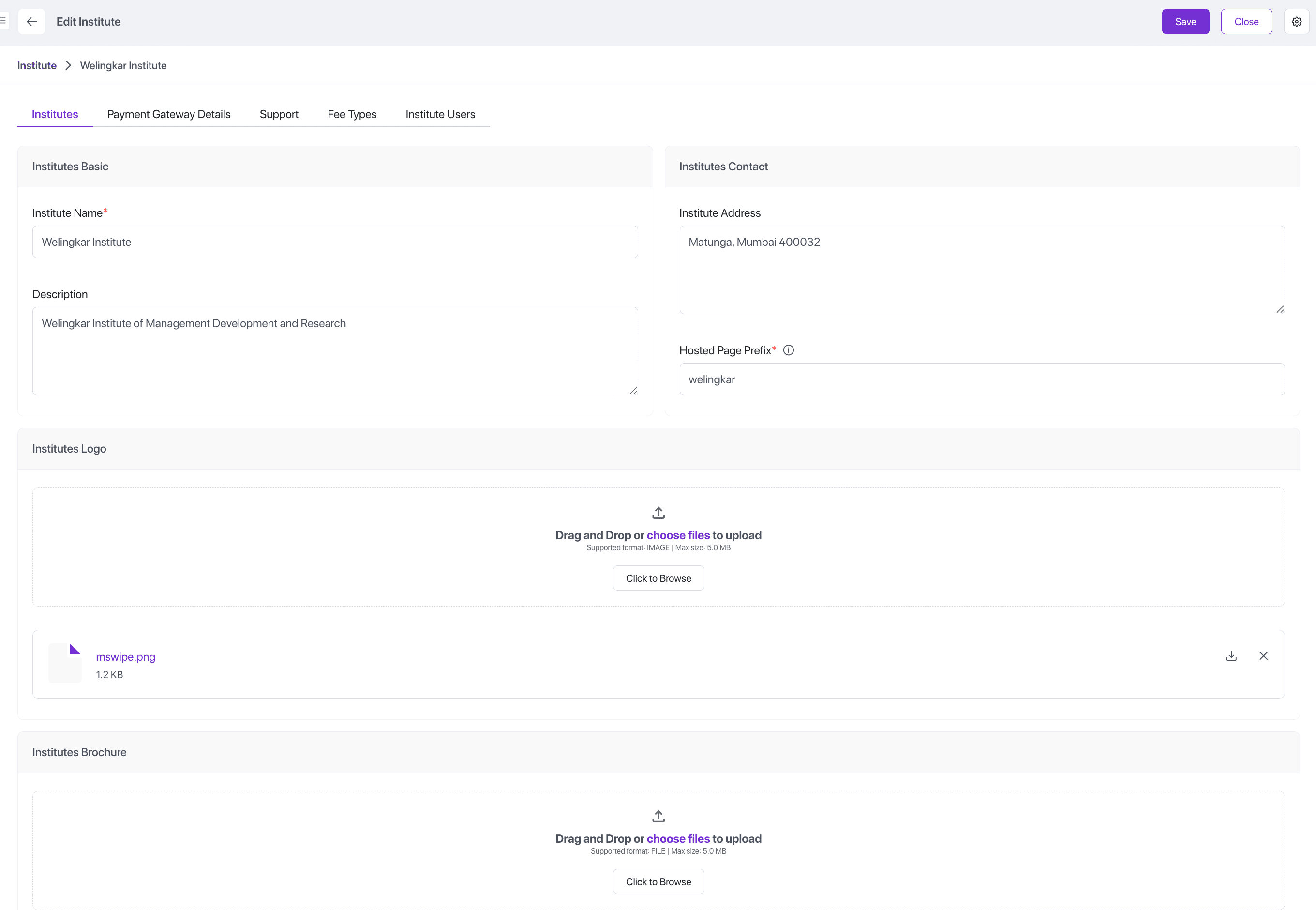 Screenshot showing the customized Institute Form View with tabs and organized fields.
1. Tabbed Organization (Notebook with Multiple Pages)
The Institute model has 21 fields covering diverse information types. Displaying all fields on a single page would be overwhelming and difficult to navigate. We organized fields into 5 logical tabs:
| Tab | Purpose | Fields Included |
|---|---|---|
| Institutes | Core institution information | Name, logo, description, address, brochure, video, hosted page prefix |
| Payment Gateway Details | Sensitive payment configuration | Merchant ID, access key, access secret, customer user ID |
| Support | Contact and legal information | Email domain, support email/mobile, GST, privacy policy, FAQs, T&C |
| Fee Types | Related fee types management | One-to-many relation showing all fee types |
| Institute Users | User management | One-to-many relation showing all institute admins |
Benefits:
- Reduces cognitive load by grouping related fields
- Separates sensitive payment information from general details
- Makes forms easier to navigate and fill out
2. Two-Column Layout for Related Fields
Within the "Institutes" tab, we use a two-column layout:
- Left Column (col-6): "Institutes Basic" - Core identity fields (name, description)
- Right Column (col-6): "Institutes Contact" - Location and access info (address, hosted page prefix)
Layout JSON Snippet:
{
  "type": "row",
  "attrs": {
    "name": "sheet-1"
  },
  "children": [
    {
      "type": "column",
      "attrs": {
        "name": "group-1",
        "label": "Institutes Basic",
        "className": "col-6"
      },
      "children": [
        {
          "type": "field",
          "attrs": {
            "name": "instituteName"
          }
        },
        {
          "type": "field",
          "attrs": {
            "name": "description"
          }
        }
      ]
    },
    {
      "type": "column",
      "attrs": {
        "name": "group-1",
        "label": "Institutes Contact",
        "className": "col-6"
      },
      "children": [
        {
          "type": "field",
          "attrs": {
            "name": "instituteAddress",
            "disabled": false
          }
        },
        {
          "type": "field",
          "attrs": {
            "name": "hostedPagePrefix"
          }
        },
        {
          "type": "field",
          "attrs": {
            "name": "status",
            "visible": false,
            "disabled": true
          }
        }
      ]
    }
  ]
}
Benefits:
- Utilizes screen real estate efficiently
- Groups semantically related information
- Creates visual balance and structure
3. Full-Width Layout for Media Fields
Logo, brochure, and intro video fields use full-width columns (col-12) with showLabel: false:
{
  "type": "column",
  "attrs": {
    "name": "group-1",
    "label": "Institutes Logo",
    "className": "col-12"
  },
  "children": [
    {
      "type": "field",
      "attrs": {
        "name": "logo",
        "disabled": false,
        "showLabel": false
      }
    }
  ]
}
Benefits:
- Media fields need more space for preview/upload UI
- Column label serves as the field label, avoiding redundancy
- Creates cleaner, less cluttered appearance
4. Hidden Status Field
The status field is hidden and disabled in the form:
{
  "type": "field",
  "attrs": {
    "name": "status",
    "visible": false,
    "disabled": true
  }
}
Rationale:
- Status changes are managed through custom action buttons ("Activate Institute", "Deactivate Institute")
- Prevents users from manually editing workflow state
- Ensures status transitions follow business rules
5. Masked Input for Sensitive Fields
Payment gateway access secret uses custom widgets:
{
  "type": "field",
  "attrs": {
    "name": "paymentGatewayAccessSecret",
    "viewWidget": "maskedShortTextForm",
    "editWidget": "maskedShortTextEdit"
  }
}
Benefits:
- Protects sensitive credentials from shoulder surfing
- Maintains security while allowing necessary access
- Similar to password fields in standard forms
6. Inline Creation for Fee Types
Fee Types relation enables inline creation:
{
  "type": "field",
  "attrs": {
    "name": "feeTypes",
    "inlineCreate": "true",
    "showFieldLabel": false,
    "showLabel": false
  }
}
Benefits:
- Users can create fee types directly from institute form
- Reduces navigation between different views
- Maintains context during data entry
- Speeds up initial setup process
7. Custom Action Buttons
Two custom buttons are added to the form:
- Activate Institute: Transitions status from InActive to Active
- Deactivate Institute: Transitions status from Active to InActive
"formButtons": [
  {
    "attrs": {
      "icon": "pi pi-caret-right",
      "name": "InstituteActivateById",
      "label": "Activate Institute",
      "action": "InstituteActivateById",
      "actionInContextMenu": true,
      "openInPopup": true,
      "visible": false
    }
  }
]
Benefits:
- Easily manage institute activation state
- Makes actions discoverable in context menu
- Provides audit trail for status changes
Complete Institute Form Layout JSON
Below is the complete form layout JSON for the Institute model:
Click to expand the complete JSON layout
{
"type": "form",
"attrs": {
"name": "form-1",
"label": "Institute",
"className": "grid",
"formButtons": [
{
"attrs": {
"icon": "pi pi-caret-right",
"name": "InstituteActivateById",
"className": "p-button-text",
"label": "Activate Institute",
"action": "InstituteActivateById",
"customComponentIsSystem": true,
"actionInContextMenu": true,
"openInPopup": true,
"visible": false
}
},
{
"attrs": {
"icon": "pi pi-circle-off",
"name": "InstituteDeactivateById",
"className": "p-button-text",
"label": "Deactivate Institute",
"action": "InstituteDeactivateById",
"customComponentIsSystem": true,
"actionInContextMenu": true,
"openInPopup": true,
"visible": false
}
}
]
},
"onFormLayoutLoad": "instituteEditHandler",
"children": [
{
"type": "sheet",
"attrs": {
"name": "sheet-1"
},
"children": [
{
"type": "notebook",
"attrs": {
"name": "notebook-1"
},
"children": [
{
"type": "page",
"attrs": {
"name": "page-1",
"label": "Institutes"
},
"children": [
{
"type": "row",
"attrs": {
"name": "sheet-1"
},
"children": [
{
"type": "column",
"attrs": {
"name": "group-1",
"label": "Institutes Basic",
"className": "col-6"
},
"children": [
{
"type": "field",
"attrs": {
"name": "instituteName"
}
},
{
"type": "field",
"attrs": {
"name": "description"
}
}
]
},
{
"type": "column",
"attrs": {
"name": "group-1",
"label": "Institutes Contact",
"className": "col-6"
},
"children": [
{
"type": "field",
"attrs": {
"name": "instituteAddress",
"disabled": false
}
},
{
"type": "field",
"attrs": {
"name": "hostedPagePrefix"
}
},
{
"type": "field",
"attrs": {
"name": "status",
"visible": false,
"disabled": true
}
}
]
},
{
"type": "column",
"attrs": {
"name": "group-1",
"label": "Institutes Logo",
"className": "col-12"
},
"children": [
{
"type": "field",
"attrs": {
"name": "logo",
"disabled": false,
"showLabel": false
}
}
]
},
{
"type": "column",
"attrs": {
"name": "group-1",
"label": "Institutes Brochure",
"className": "col-12"
},
"children": [
{
"type": "field",
"attrs": {
"name": "instituteBrochure",
"disabled": false,
"showLabel": false
}
}
]
},
{
"type": "column",
"attrs": {
"name": "group-1",
"label": "Institute Intro Video",
"className": "col-12"
},
"children": [
{
"type": "field",
"attrs": {
"name": "instituteIntroVideo",
"disabled": false,
"showLabel": false
}
}
]
}
]
}
]
},
{
"type": "page",
"attrs": {
"name": "page-2",
"label": "Payment Gateway Details"
},
"children": [
{
"type": "row",
"attrs": {
"name": "sheet-1"
},
"children": [
{
"type": "column",
"attrs": {
"name": "group-1",
"label": "Payment Gateway Details",
"className": "col-6"
},
"children": [
{
"type": "field",
"attrs": {
"name": "paymentGatewayMerchantId"
}
},
{
"type": "field",
"attrs": {
"name": "paymentGatewayAccessKey"
}
},
{
"type": "field",
"attrs": {
"name": "paymentGatewayAccessSecret",
"viewWidget": "maskedShortTextForm",
"editWidget": "maskedShortTextEdit"
}
},
{
"type": "field",
"attrs": {
"name": "custUserId"
}
}
]
}
]
}
]
},
{
"type": "page",
"attrs": {
"name": "page-4",
"label": "Support"
},
"children": [
{
"type": "row",
"attrs": {
"name": "sheet-1"
},
"children": [
{
"type": "column",
"attrs": {
"name": "group-1",
"label": "Basic",
"className": "col-6"
},
"children": [
{
"type": "field",
"attrs": {
"name": "emailDomain",
"disabled": false
}
},
{
"type": "field",
"attrs": {
"name": "supportEmail"
}
},
{
"type": "field",
"attrs": {
"name": "supportMobile",
"disabled": false
}
},
{
"type": "field",
"attrs": {
"name": "gst",
"disabled": false
}
}
]
},
{
"type": "column",
"attrs": {
"name": "group-1",
"label": "Standard Informational",
"className": "col-12"
},
"children": [
{
"type": "field",
"attrs": {
"name": "privacyPolicy",
"disabled": false
}
},
{
"type": "field",
"attrs": {
"name": "faqs"
}
},
{
"type": "field",
"attrs": {
"name": "tnC",
"disabled": false
}
}
]
}
]
}
]
},
{
"type": "page",
"attrs": {
"name": "page-5",
"label": "Fee Types"
},
"children": [
{
"type": "row",
"attrs": {
"name": "sheet-1"
},
"children": [
{
"type": "column",
"attrs": {
"name": "group-1",
"label": "Fee Types",
"className": "col-12"
},
"children": [
{
"type": "field",
"attrs": {
"name": "feeTypes",
"inlineCreate": "true",
"showFieldLabel": false,
"showLabel": false
}
}
]
}
]
}
]
},
{
"type": "page",
"attrs": {
"name": "page-6",
"label": "Institute Users"
},
"children": [
{
"type": "row",
"attrs": {
"name": "sheet-1"
},
"children": [
{
"type": "column",
"attrs": {
"name": "group-1",
"label": "Institute Users",
"className": "col-12"
},
"children": [
{
"type": "field",
"attrs": {
"name": "instituteUsers",
"inlineCreate": "false",
"showFieldLabel": false,
"showLabel": false
}
}
]
}
]
}
]
}
]
}
]
}
]
}Fee Type Form View Customizations
1. Grouped Fields Layout
Fee Type form organizes fields into three columns:
| Column | Label | Width | Fields |
|---|---|---|---|
| Column 1 | "Fee Type" | col-6 (half) | Fee type name, part payment allowed |
| Column 2 | "Late Payment" | col-6 (half) | Late payment type, late payment fees |
| Column 3 | "Institute" | col-6 (half) | Institute relation (hidden) |
Layout JSON Snippet:
{
  "type": "row",
  "attrs": {
    "name": "sheet-1"
  },
  "children": [
    {
      "type": "column",
      "attrs": {
        "name": "group-1",
        "label": "Fee Type",
        "className": "col-6"
      },
      "children": [
        {
          "type": "field",
          "attrs": {
            "name": "feeType"
          }
        },
        {
          "type": "field",
          "attrs": {
            "name": "partPaymentAllowed"
          }
        }
      ]
    },
    {
      "type": "column",
      "attrs": {
        "name": "group-1",
        "label": "Late Payment",
        "className": "col-6"
      },
      "children": [
        {
          "type": "field",
          "attrs": {
            "name": "latePaymentFeesType"
          }
        },
        {
          "type": "field",
          "attrs": {
            "name": "latePaymentFees"
          }
        }
      ]
    },
    {
      "type": "column",
      "attrs": {
        "name": "group-1",
        "label": "Institute",
        "className": "col-6",
        "visible": false
      },
      "children": [
        {
          "type": "field",
          "attrs": {
            "name": "institute"
          }
        }
      ]
    }
  ]
}
Benefits:
- Related payment settings grouped together
- Visual separation between core info and payment rules
- Efficient use of screen space
2. Hidden Institute Field
The institute relation is hidden (visible: false):
{
  "type": "column",
  "attrs": {
    "name": "group-1",
    "label": "Institute",
    "className": "col-6",
    "visible": false
  }
}
Rationale:
- Institute is already known from context (user's current institute)
- Automatically set by form handler (
feeTypeEditHandler) - Prevents users from accidentally assigning fees to wrong institute
- Simplifies form interface
Complete Fee Type Form Layout JSON
Below is the complete form layout JSON for the Fee Type model:
Click to expand the complete JSON layout
{
  "type": "form",
  "attrs": {
    "name": "form-1",
    "label": "Fee Type",
    "className": "grid"
  },
  "onFormLayoutLoad": "feeTypeEditHandler",
  "children": [
    {
      "type": "sheet",
      "attrs": {
        "name": "sheet-1"
      },
      "children": [
        {
          "type": "row",
          "attrs": {
            "name": "sheet-1"
          },
          "children": [
            {
              "type": "column",
              "attrs": {
                "name": "group-1",
                "label": "Fee Type",
                "className": "col-6"
              },
              "children": [
                {
                  "type": "field",
                  "attrs": {
                    "name": "feeType"
                  }
                },
                {
                  "type": "field",
                  "attrs": {
                    "name": "partPaymentAllowed"
                  }
                }
              ]
            },
            {
              "type": "column",
              "attrs": {
                "name": "group-1",
                "label": "Late Payment",
                "className": "col-6"
              },
              "children": [
                {
                  "type": "field",
                  "attrs": {
                    "name": "latePaymentFeesType"
                  }
                },
                {
                  "type": "field",
                  "attrs": {
                    "name": "latePaymentFees"
                  }
                }
              ]
            },
            {
              "type": "column",
              "attrs": {
                "name": "group-1",
                "label": "Institute",
                "className": "col-6",
                "visible": false
              },
              "children": [
                {
                  "type": "field",
                  "attrs": {
                    "name": "institute"
                  }
                }
              ]
            }
          ]
        }
      ]
    }
  ]
}
List View Customizations
Role-Based Action Permissions
List views configure which roles can perform specific actions:
"configureViewActions": {
  "import": { "roles": ["Admin"] },
  "showArchived": { "roles": ["Admin"] },
  "export": { "roles": ["Admin", "App Admin", "Institute Admin"] },
  "customizeLayout": { "roles": ["Admin", "App Admin", "Institute Admin"] },
  "saveCustomFilter": { "roles": ["Admin"] }
}
Benefits:
- Enforces role-based access control at UI level
- Reduces clutter by hiding unavailable actions
- Improves security by limiting sensitive operations
- Provides appropriate capabilities based on user role
General Design Principles
The customizations follow these principles:
- Progressive Disclosure: Show essential information first, details in tabs
- Contextual Relevance: Hide fields that are auto-populated or irrelevant
- Guided Input: Group related fields to guide users through data entry
- Security by Design: Mask sensitive data, control access to actions
- Efficiency: Enable inline operations to reduce navigation
- Consistency: Use similar patterns across related forms
These customizations transform the auto-generated UI into a polished, user-friendly interface tailored to the fees portal domain.
Applying Your Customizations
Now that you have the customized layout JSONs ready, follow the steps in Applying View Customizations to apply them via the Layout Builder.
Data Setup
Follow this order to set up your data and test if the portal is ready for use:
Phase 1: Login As Super Admin
Step 1: Login
- Log in to the SolidX platform using Super Admin credentials i.e (
sacredentials, created during the initial application setup).
Step 2: Create the Institution
- Enter basic details (name, address, contact info)
- Upload your logo
- Enter payment gateway credentials (from your provider)
- Choose a unique subdomain prefix for your payment page
Step 3: Create Institute Admin Users
- Add staff members who will manage the portal
- Set their role as "Institute Admin"
- Link them to the institution created in Step 2
- Note the login credentials for these users
Phase 2: Login As Institute Admin
Step 5: Login
- Institute Admin user logs in using the credentials created in Step 3
Step 6: Add Fee Types
- Access the Institute from the Institute listing page
- Edit the Institute to add different fee types
- List all fee categories you collect (e.g., Tuition, Bus, Hostel)
- For each fee type, decide:
- Can students pay in parts?
- Do you charge late fees? If yes, how much?
Congrats! You've successfully onboarded an institution. Now we can move on to creating payment collections and managing student payments.